DB25 Snake Cable Support: Multi-Channel Analog and Digital Audio
DB25 Snake Cable Support: Multi-Channel Analog and Digital Audio
Professional audio interfaces often use DB25 connectors to pack multiple audio channels into a single cable. StudioFlow now supports DB25 snake cables with proper channel breakout, letting you route individual channels from multi-channel interfaces to your gear.
Understanding DB25 Audio Configurations
DB25 connectors in pro audio come in several flavors, and getting the pinout wrong means your audio won’t work. StudioFlow supports the most common standards:
Analog DB25 Standards
TASCAM Analog - The most common analog standard, used by Focusrite, Universal Audio, and many others. Provides 8 balanced analog channels on a single DB25 connector. Channels are bidirectional.
Yamaha Analog - An alternative analog standard used by some manufacturers. Also provides 8 balanced analog channels but with different pin assignments than TASCAM. Channels are bidirectional.
Digital DB25 Standards
TASCAM Digital - Carries 4 AES/EBU stereo pairs (8 channels total) in a specific pinout. Has dedicated input and output channels - 4 AES/EBU inputs and 4 AES/EBU outputs.
Yamaha Digital - Alternative digital pinout used by some manufacturers. Like TASCAM Digital, it provides 4 AES/EBU input channels and 4 AES/EBU output channels, but with different pin assignments.
Getting the right standard matters. Using a TASCAM cable with Yamaha-pinout gear (or vice versa) means your audio ends up on the wrong channels, or doesn’t work at all.
How to Use DB25 Connections
Adding gear with DB25 ports:
When adding gear, select the DB25 connection type from the physical port dropdown, then choose your configuration from the DB25 Type dropdown that appears.
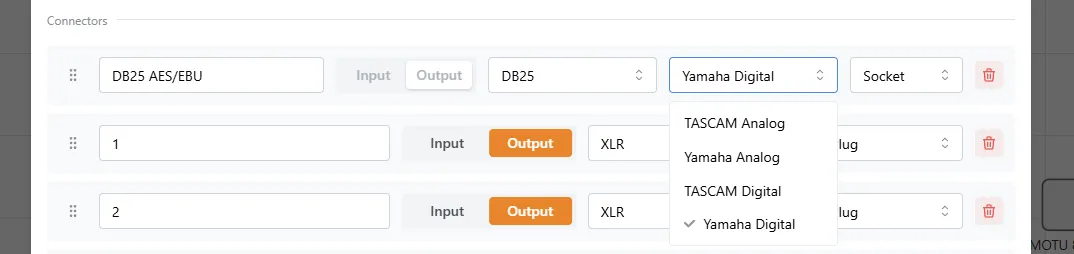
Connecting individual channels:
When you drag a connection to or from a DB25 port in the Connections view, StudioFlow shows you which channels are available and lets you select the specific channel to connect.
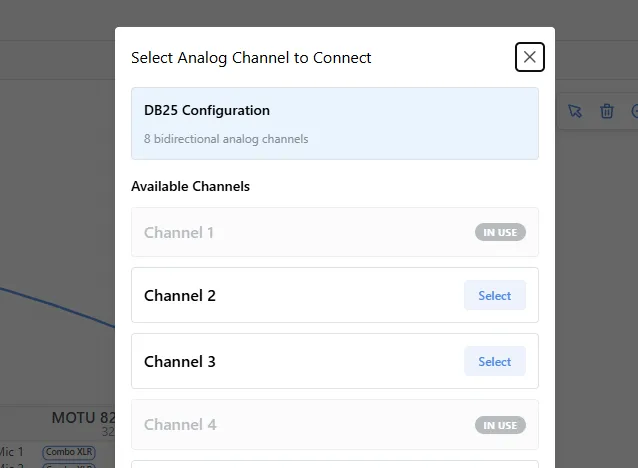
The modal shows:
- DB25 Configuration - Your selected standard and how many channels it provides
- Available Channels - Channels not yet in use (shown as interactive cards)
- In Use Channels - Channels already connected (shown as dimmed cards)
For digital DB25 configurations, each channel is clearly labeled as Input or Output, so you only see channels that are compatible with your connection direction.
Bill of Materials (BOM) Integration
When you use DB25 connections, your BOM automatically groups them as “DB25 Snake Cables” with details about:
- How many channels you’re using from each DB25 port
- The longest cable run (for the main snake)
- The fanout distance (how far apart the individual channel breakouts need to reach)
This helps you order the right snake cables - not just the main trunk length, but also how long the individual channel tails need to be.
When to Use DB25
DB25 snake cables shine when you need to connect multiple channels between two devices:
- Interfaces with DB25 I/O (Focusrite RedNet, Apollo interfaces, etc.)
- Patch bays with DB25 connections
- Stage boxes and wall plates
- Multi-channel A/D and D/A converters
For single-channel connections, regular XLR or TRS cables are simpler. But when you need 8 channels between two devices, one DB25 cable beats running 8 individual cables through cable trays.
Ready to plan your multi-channel studio? Visit StudioFlow and start designing today.